Wednesday, December 24, 2008

How Should I Use Flickr?

After I uploaded a picture to flickr and wanted to post it in my blog, I found the flowing tips:
Remember! Flickr Community Guidelines specify that if you post a Flickr photo on an external website, the photo must link back to its photo page. (So, use Option 1.)


Flickr provides two kinds of HTML code. The first links to flickr page, like this:
Flower
The second is the URL of the picture, like this:
http://farm4.static.flickr.com/3209/3133269506_6d6c83b9ac_m.jpg

The flickr guidelines tell us that we must provide a link from each photo or video back to its page on Flickr. So I think the second code is not allowed. But why flickr provides it?

I used to link the full size picture's URL and show the small size picture in my blog. So visitors can get the original picture directly. Like this:


Up to now, it has no problem. But I'm not sure. Can anyone tell me that can I use flickr like this?

Monday, September 22, 2008

Received Google AdSense PIN

This morning I received a card from Google. It is the Google AdSense PIN. I remembered that my AdSense income reached over $10 last month. To my surprise, it is not very large and it came from Mountain View. After lunch I came back to my dormitory, then login to my AdSense account and entered the PIN code. The second is the telephone verification. After I entered my telephone number, in less 3 seconds, the telephone rang. I got an code from the phone and entered it in my AdSense account.

The process is very easy. This mail is the first mail that I received from Google. I hope I will receive the first earning from Google in some day.

Wednesday, August 27, 2008

Adsense, Adsense...

More than twenty days have gone since August 1st. I am very glad that the Adsense in this blog give me more than $5. Although it is not much, it is the best result since I used Adsense. Adsense gave me dreams before, now I hope the dreams will come true.

Up to now, I have got 12 clicks from this blog in August. A strange thing is that all the clicks are from the right sidebar instead of the big rectangle below every article. I thought the big rectangle would give me more income. But it seems that I was wrong.

I know to get more income, I should to get more traffic. I think the value of a blog not only depends on its traffic but also its contents. Providing useful information is the most important thing. So I should put my heart into writing better contents. Several days ago I posted a thread on DigitalPoint that said I wanted to earn $10/month with Adsense. I believe it is not just a dream any more.

Tuesday, August 19, 2008

New Site

My new blog site: Programming Note has launched! I choose WordPress as the blog program, since WordPress is written by PHP and there are many plugins to extends its functions. Also, I have added AdSense to that site. I hope it can give me more income.

As its title. Most topics on Programming Note are about programming in the future, since I like programming and like to write something about it. With plugins, WordPress is fit for pasting code. This is much better than Blogger. However, it doesn't mean that this blog is dead. I will update this blog in the future.

Sunday, August 17, 2008

Is a Domain Name Important?

One of my friends bought some domain names. He said that owning a domain was very important. One of his domain names is hcn.name and he made a Chinese weblog on blog.hcn.name. However, I couldn't understand how important a proper domain name is and why he was so interested in it. I think domain names are just used to make up URLs. Many people don't want to try to remember your domain name. I think they like bookmarks or Google better. For me, if I want to find something, Google is enough. If I find a good website, I will add it to my bookmarks. So I seldom remember a website's domain name.

Some people advised me to buy a domain name for this blog. But I don't know what and how much a domain name can give me. I mean, owning a domain name, not web space. Traffic, pagerank, or Adsense don't seem to have to do with a domain name. Therefore, I still use this sub domain of blogspot.com.

Is it really important that owning a domain name? Or if you think it would be better to buy a domain name for this blog, what domains names are the best? Thank you for leaving your comments.

Wednesday, August 13, 2008

Gedit as an Editor for Programmers

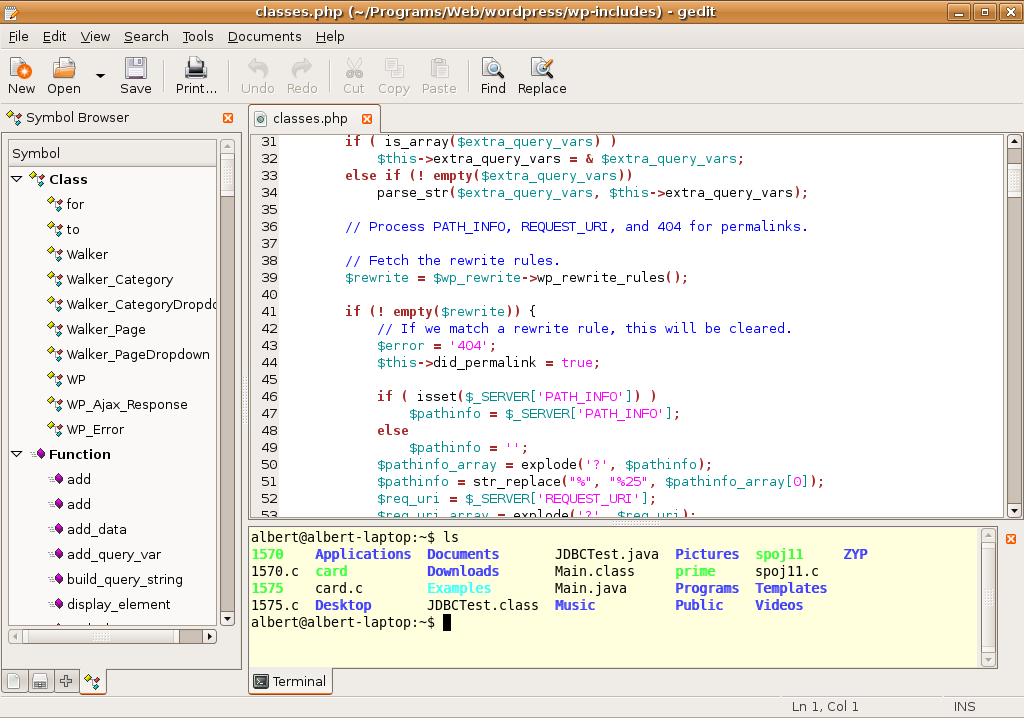
Gedit is a lightweight and powerful text editor. It is included in Ubuntu Linux. Gedit supports plugins, so you can add some plugins to extend your editor. With plugins, Gedit is not only a simple text editor.
As a programmer's editor, it should show line numbers, enable automatic indentation, etc. Open "Edit" -> "Preferences". There are for tabs in the dialog. You'd better go to "View" tab and check "Display line numbers" and "Highlight matching bracket". Next, check "Enable automatic indentation" in the "Editor" tab.

"Plugins" tab is used for enabling and disabling Gedit's plugins. Open "Plugins" tab, then you can find the installed plugins. So please check which plugins you have installed firstly. If what you need has not been installed, please visit http://live.gnome.org/Gedit/Plugins. To install a plugin is very easy. Just extract the files to ~/.gnome2/gedit/plugins/ then restart Gedit. I think the following plugins are useful for programming:
  • Code comment: It adds "Comment code" and "Uncomment code" to the "Edit" menu. It can help you comment and uncomment code quickly.
  • Color Picker: If you enable this plugin, "Pick color..." will be added to the "Tools" menu. It opens gcolor2 to help you to choose color. If you don't have "gcolor2", you need to run "sudo apt-get install gcolor2" to install it first..
  • Embedded Terminal: It adds a terminal frame in the bottom pane. You can use "Ctrl+F9" to toggle it.
  • File Browser Pane: It adds a simple file browser into the left pane.
  • Indent Lines: After turn on this plugins, you will find "Indent" and "Unindent" options in the "Edit" menu. It can increase or decrease indentation quickly.
  • Split View 2: "Toggle Split View" will be added to the "View" menu. You can split the document frame and see more that one file at the same time.
  • Symbol Browser: It is added to left pane. When you open a source code file, it can show the classes and functions, etc. It is very useful for programming.
  • Tag List: Some common tags for HTML, XML, etc.
Gedit plugins can be written in C or Python. If you want to write your own plugins, read C plugin howto and Python plugin howto.

Sunday, August 10, 2008

Some Problems of Tomcat on Ubuntu 8.10

I found that Tomcat 5.5 package of Ubuntu Linux had some serious problems.

Normal users can't control Tomcat server. If you want to start/restart/shutdown Tomcat, you must use "sudo". For developers, restarting Tomcat is very frequent, therefore, typing "sudo" again and again becomes a dirty work.

Problems about MySQL connection. The default bootstrap of Tomcat is /etc/init.d/tomcat5.5 and it starts Tomcat server automatically. But the serious problem is: Tomcat con't connect to MySQL database! I don't know why. However, if I start Tomcat with /usr/share/tomcat5.5/bin/startup.sh, Tomcat can connect to MySQL. Why the two methods to start Tomcat are different?

Class loading problems. I wrote my first servlet that can connect MySQL with JDBC and found some strange problems. I create three files:
  • Database.java: the database class, which encapsulates some database operations;
  • DBTestServlet.java: the servlet class that calls Database class to operate database.
All files (class file, jar file, web.xml, etc) are located in proper directory. But Tomcat said it can't find the JDBC driver class (Database class has a method that calls DriverManager.getConnection() to get a database connection), although I had put mysql-connector-java-5.1.6-bin.jar in WEB-INF/lib. But if I used JDBC API in DBTestServlet class directly, no problem happened. However, the stranger is: if I started Tomcat from root account (I need to enable root accout and use "su" to switch to root, see Enable and Disable "root" on Ubuntu Linux) instead of using "sudo", no problem happened, even if I used Database class. That's very strange.

I don't know why Ubuntu's Tomcat package has so many problems. Perhaps the best solution is to download Tomcat from http://tomcat.apache.org/ and extract it to a directory instead of using "sudo apt-get install tomcat5.5".

Tuesday, August 5, 2008

Unix Searching Tool -- find

The command "find" exists on almost all Unix. It is used for searching files. "find" can help you find files with specified attributes. In many conditions, "find" can work with other programmes well. Here I will take some examples to show the power of "find".

Suppose you have a directory named "shop" which contains many PHP files, but it contains some sub-directories, so you cannot use "ls *.php" to show all the PHP files. "find" can solve the problem:
find shop -name '*.php'
"find" searches all the sub-directores recursively and find all files whose names match the pattern "*.php" and print their paths. The argument "-name" means matching the filename.

If you need to calculate how many PHP files there are in the "shop" directory, just need use "wc" command to count the number of lines that "find" produced.
find shop -name '*.php' | wc -l
It proves that Unix "pipe" is very powerful and useful.

Beside matches file name, find can accept other conditions, for example, last modified time. In my computer, Tomcat (a JSP/Servlet container with a web server) generates log files on /var/log/tomcat5.5/. If I want to show the log files which are modified more than 2 days ago, I can use "-mtime" argument:
find /var/log/tomcat5.5/ -mtime +2
"-mtime" means "last modified time" and "+2" means "more than 2 days". Furthermore, I want to delete all the Tomcat log files which is generated more than 2 days ago. I can use "xargs" to combine "find" with "rm":
find /var/log/tomcat5.5/ -mtime +2 -print | xargs rm -f
"find" also supports logical operators. For the example above, if I need find the log files whose last modified time is more than 5 days or less than 3 days, I can use "find" as below:
find /var/log/tomcat5.5/ -mtime +5 -or -mtime -3.
"find" supports three logical operators: -not, -and, -or.

Certainly, the functions of "find" are too many to talk about. All the information about "find" can be finded by "man find", although it is not easy to read.

Sunday, August 3, 2008

Making Executable JAR

As a Java programmer, you probably need to make JAR file, a compressed file which contains all necessary .class files, like tar (a widely used file format in Unix). For some reasons, you may want to make executable JAR file, which can run by "java -jar filename.jar" or just double click it on Windows. Here are the steps about how to make an executable JAR.

Suppose these are the source code:
src/com/wjb/goose.java
src/com/wjb/dog.java
src/com/wjb/zoo.java
Each source file contains only one class (except inner class) and belongs to the package "com.wjb".

For convenience, you'd better put the .class file into another directory, for example, classes. Here, directory classes and src are in the save level. The best way to do it is using "-d" argument. Open the terminal (or "command line prompt" on Windows), typing these commands:
cd src # Enter source code directory
javac -d ../classes com/wjb/goose.java
javac -d ../classes com/wjb/dog.java
javac -d ../classes com/wjb/zoo.java
-d ../classes means put the .class file into ../classes directory and build proper sub-directories according to the package name. For this example, it will make classes/com/wjb and all the class file will be put there.

Now suppose the Zoo class has the main method, i.e. it is the starting point of the whole programs. If you want to make executable JAR, you must specify the class that has the main method. So you need a special file: manifest.txt.

Create a text file named manifest.txt and save it in "classes" directory. This file has only one line:
Main-Class: com.wjb.Zoo
Note that there is a blank character after the colon ":" and you must use its full class name (containing package name).

Next, go to "classes" directory and execute this command:
jar -cmvf manifest.txt zoo.jar com
If everything is OK, the zoo.jar will be created. It is executable. You can use "java -jar zoo.jar" to test it or just double click its icon if you are using Windows.

In addition, the simple usage of "jar" to create a JAR file is:
jar -cmvf <manifest.txt> <filename.jar> <input files>

Here, "<input files>" are files or directories. You can specify more than one file or directory if you want to add many files into JAR. If you need the complete reference, please read the jar manual.

Tuesday, July 29, 2008

Why Do You Use Linux?

My last post was submitted to here and received many comments. Because I didn't introduce myself clearly, some people misunderstand me. I think I am not a linux beginner and I have tried some distros such as Fedora, Debian, Gentoo for more than 3 years... I found that many people ignore an important question: why do you use it (linux)?

Don't say freedom and open source. I don't think source code is useful for normal users. Linux, of cource, is simply one kind of operation systems. I choose it only because it can work well. Why do people use computer? People need its help. Why the "Linux supporters" intend to explore Linux itself, not to how to use it to finish our work more effectively?

I've seen some people who have play with Linux for several years. But to my surprise, they don't know how to use Linux to finish their work. Linux is just an advanced toy. They often install some new distributions and compare them. They spend too much time on something unuseful, such as 3D-desktop, window animation... If you like Linux only because of these, Linux is just a toy for you.

Linux is just an OS, software. From a programmer's perspective, it's just a collection of programs, binary code ... It isn't special. But Linux has many distributions. Choosing one to start isn't an easy work. But the same thing: they are Linux! I think the most thing for a person who is working with Linux is to learn Linux/Unix commands. If he can use command line to solve most problems, many Linux distributions is "same" for him. But the goal is: finishing his work better.

If you are using Linux or plan to go to Linux world, think over this question: why do you use Linux?

Monday, July 28, 2008

Ubuntu Linux is Much Better than Windows

I have worked with Ubuntu Linux for about 2 months and find that Ubuntu is much better than Windows. My computer is Thinkpad T43 laptop. The reasons that Ubuntu is better are:

Wireless network supported. My laptop's wireless network card is Intel PRO/Wireless 2200BG. After booting from Ubuntu live CD, the wireless network is usable. Even you can install Ubuntu and surf the Internet at the same time. However, Windows XP doesn't support the wireless network adapter. So I have to download the driver from other computer and copy it to my laptop. Obviously, it is dirty work.

No need to look for software all over the world. Ubuntu, or any Debian-based Linux distribution, uses APT to manager the software packages. If you need to install some software, for example, apache2, you don't have to look for a download site but just execute "sudo apt-get install apache2". Ubuntu will download all necessary packages from its repositories. Installation and configuration are done by APT, the software package manager. If you don't know the package's name you want, you can use Synaptic Package Manager to find one. It is a GUI front-end of APT.

Perfect Chinese supported. Ubuntu 8.04 give me more beautiful Chinese fonts than 7.10. After installation, go to "System -> Administration -> Language Support" and check the Chinese option and the "Enable support to enter complex characters" option. Then you will get some Chinese fonts and input methods. It is extremely easy.

Anti-virus software is no need. When I used Windows, I have to install an anti-virus tool after installation. However, I think it isn't necessary for Linux. The viruses on Linux are much fewer than those on Windows. Since I don't install anti-virus software, my computer runs faster.

More useful softwares. After installation you can get many useful softwares. OpenOffice, GIMP, Pidgin... you can work immediately. However, on Windows, you have to install MS Office, GTalk or MSN Messenger... after Windows installation. Some people may not like so, they prefer to controlling their computer completely, so they don't like these softwares Ubuntu provides. No problem, just use "Applications -> Add/Remove..." to remove those you don't like.

Free and easy to use. Almost all the Linux distributions are free to use. Most softwares for Linux are also free. It makes people who are using Linux save lots of money. Besides, I think Ubuntu is easier to use than other Linux distributions, even Windows! No cost doesn't mean low-quality.

Sunday, July 27, 2008

Install Ubuntu 8.04 from Hard Disk

According to Ubuntu official website, installing Ubuntu 8.04 or upgrade to Ubuntu 8.04 from older version need CD. But in fact, burning a CD is not necessary. If you have installed a distribution of Linux but have no CD writer, you can also install Ubuntu 8.04 by the ISO file. I installed it from hard disk just now and now I am going to write something about how to do it.

First, make sure that you have more than one partitions (except swap partition). For example, I have two partitions /dev/sda1 (mounted as /) and /dev/sda5 (mounted as /home). Since I planned to install Ubuntu 8.04 on /dev/sda1. I downloaded the desktop iso file from here and save it in /home, the /dev/sda5 partition. So the full path of the ISO file is: /home/ubuntu-8.04.1-desktop-i386.iso.

Second, extract /casper/vmlinuz and /casper/initrd.gz from the ISO file. Since I had installed Ubuntu 7.10, I need to execute the following commands:
cd /home
sudo mount -o loop ubuntu-8.04.1-desktop-i386.iso /media/cdrom0
sudo cp /media/cdrom/casper/vmlinuz .
sudo cp /media/cdrom/casper/initrd.gz .

Now edit the grub configuration file /boot/grub/menu.lst. Add this item:
title Install Ubuntu
root (hd0,4)
kernel /vmlinuz boot=casper iso-scan/filename=/ubuntu-8.04.1-desktop-i386.iso
initrd /initrd.gz

Note: the red text (hd0,4) means the fifth partition on the first hard disk. i.e. it means /dev/sda5. The partition number of grub is from zero, not one.

Save menu.lst and reboot your computer. You can start Ubuntu 8.04 live CD from grub and install it to your hard disk as using CD. The only thing you must care about is that you mustn't format the partition which contains the ISO file. In my installation, the ISO file is at /sda5 so I can't format it. In addition, I mounted /home onto /dev/sda5.

Sunday, July 20, 2008

Enable and Disable "root" on Ubuntu Linux

On Ubuntu Linux, the "root" account is disabled by default. Normal users can use "sudo " to when he has to run a programe as root. This provides a bit more safety but sometimes typing "sudo" is dirty work. On other Linux distributions, you can use "su" to switch into root account. You can enable the function on Ubuntu.

Set the root's password:
sudo passwd root

Enter the password twice. Now you can use "su" to enter root account.

But how to disable root's account? The answer is "passwd". In your normal account, type "sudo passwd -l root". Here, the argument "-l" means "lock". It locks the root account. However, you can unlock the root account by typing "sudo passwd -u root" if you have set the root's password. Here, the "-u" means "unlock".

Friday, July 18, 2008

Windows on Linux

I have used Ubuntu Linux for about one month and I feel I like Linux better than Windows. But sometimes I need to work on Windows, for example, some online banks only support IE. So I have to use Windows. I think it is good to install Windows with virtual machine. At last I chose VirtualBox, a virtual machine software with a user friendly GUI. On Ubuntu Linux, just use "sudo apt-get install virtualbox" to install it. Next, add my user account to group "vboxusers". My computer's memory is 512MB, not too much, but Windows runs well in VirtualBox.
Screenshot-Windows XP [Running] - VirtualBox OSE-1


Creating a new virtual machine with VirtualBox wizard is very easy. VirtualBox can use the real CD drive directly, but to make installation faster, I make an ISO image file from my Windows CD. Making ISO image file is very easy with Linux. On my laptop the CDROM is /dev/scd0. What I need to go is inserting the Windows CD into the CD drive and executing "cat /dev/scd0 > windows.iso". After a while I got the ISO file -- windows.iso. Then modify the virtual machine's properties to make it use the ISO image instead of the real CD drive. Click the "Settings" button and configure "CD/DVD ROM" as below:
Screenshot-Windows XP - Settings

When the virtual Windows is running, right Ctrl+F turns on/off the full-screen mode. When working in full-screen, it is almost the same with the real Windows.

Saturday, July 12, 2008

Installing Tomcat on Ubuntu Linux

I installed Tomcat on my laptop which runs Ubuntu Linux. APT package manager makes it very easy to install many software packages.

Firstly, make sure that you have configured software sources correctly. Go to "System"--"Administration"--"Software Sources" and do it as below:
Screenshot-Software Sources
If you skip this step, apt-get may not find tomcat package.

Before installing tomcat, I have to install Java programming environment. Just use "sudo apt-get install sun-java6-jdk sun-java6-jre" to install JDK and JRE. I suggest choosing Sun JDK or JRE. If you have more than one, you'd better use "sudo update-alternatives --config java" and "sudo update-alternatives --config javac" to choose Sun Java interpretor and compiler as default.

Then you can install tomcat-5.5 with "sudo apt-get install tomcat5.5". After that, Tomcat will start. The default port is 8180. i.e. you can visit http://localhost:8180 to test your tomcat. If you see a blank page, it means tomcat works.

One of configure files is /etc/tomcat5.5/server.xml. I want to make tomcat use port 8080. Open it and find:
<Connector port="8180" maxHttpHeaderSize="8192" .... />
Change ""8180" to "8080", save it and use "sudo /etc/init.d/tomcat5.5 restart" to restart tomcat.

The last step you should specify a directory as web root directory. Go to /etc/tomcat5.5/Catalina/localhost directory, add an XML file (for example: ROOT.xml) which contains:
<Context path="/" docBase="/home/albert/Programs/JavaEE" reloadable="true" />
Put a JSP file (test.jsp) in /home/albert/Programs/JavaEE/, which contains:
<% out.println("It works"); %>
Restart tomcat and visit http://localhost:8080/test.jsp to test it.

Wednesday, July 9, 2008

A Problem of Gvim on Ubuntu Linux

My ubuntu linux is version 7.10. I installed Gvim (Vim for X Window) yesterday, but it has a serious problem: I cannot enter correct character with keyboard. For instance, I press 'g', but it shows 'h'. I've searched this problem on Google and found a very simple solution.

Just use your favourite text editor to open /etc/vim/gvimrc and find the lines:
if has('gui_gtk2')
set guifont=Bitstream\ Vera\ Sans\ Mono\ 12
else
set guifont=-misc-fixed-medium-r-normal--14-130-75-75-c-70-iso8859-1
endif

The five lines should be commented with quotes. Just remove it. Now save it and restart Gvim. If everything is OK, it should work.

Saturday, June 7, 2008

Switching to Linux

I have been playing with Linux these days. Windows has gone. Although I met Linux about 5 years ago, I also used Windows at the same time. But Windows became slower and slower and there are too many viruses. Several days ago I can't bear the speed of Windows, so I decided to remove Windows and install Linux. I won't want to return the Windows world.

There are too many Linux distributions to choose. I think Gentoo Linux is the best one. Because its software package management is very elegant. It is a distribution based on source code. i.e. all the software is built from source code. So it is very suitable for programming. But it is hard to install. At last I choose Ubuntu, a desktop Linux distribution. Its installation is very easy and after 1 hour I got a whole operating system.

There are many interesting things in Linux. I will write something about it in the future.

Friday, May 30, 2008

CakePHP: Working with View

In the last article, I wrote a 'Hello World' program.
class TestersController extends Controller{
  var $uses=null;
  var $autoRender=false;
  function sayHello(){
    echo 'Hello, CakePHP!';
  }
}
?>

But it has a problem. According to MVC pattern, a controller shouldn't be used for displaying. However, that example uses 'echo' statement in the controller. It is a bad style. In MVC, view is used for showing data. So today I will write something about how to use view to display a page.

A view is usually a file containing much HTML but bit of PHP code. In CakePHP, a controller is associated with some views, depending on its name. For instance, the controller "Testers", its class name is "TestersController" and it must be located in app/controllers/testers_constroller. Its view must be located in app/views/testers/. Each action can have its view. For example, the view of TesterConstroller::sayHello() is app/views/testers/say_hello.thtml. No more to say, let's have a look at the view's content (say_hello.thtml):
Hello, !

You see, it's very simple, just displays a variable $name. Now the questing is: how to pass the variable from the controller? The answer is "set()". Modify the controller class above:
class TestersController extends Controller{
  var $uses=null;
  function sayHello(){
    $this->set('name','Woody');
  }
}
?>
Here, $this->set('name','Woody') set the variable $name. You see, now the controller don't contain output statement. It just set some variables and pass them to a view (because I removed "$autoRender=false", CakePHP will execute app/views/testers/say_hello.thtml). Now open http://localhost/cake/testers/sayHello (suppose your CakePHP project is in WEBROOT/cake/ directory), you will see "Hello, Woody!".

But there's is another problem. The result contains some more we don't want, like the big title "CakePHP Rapid Development" and the CakePHP's logo on the bottom right. Why is it? The answer is "layout". A layout is similar to a view. Considering a real website. It may contain many pages. But all the pages have some same elements, such as top banner, header text, CSS, etc. We don't need to put these things into all views. Just need layout once. Layout is used for sharing common view elements and it is usually a completed HTML file. Since we haven't create our layout, CakePHP will use its own.

Now let's create a default layout. Its file path is "/app/views/layouts/default.thtml". The content:
<html>
<head>
<title><?php echo $title_for_layout; ?></title>
</head>
<body>
<h1>Learn CakePHP</h1>
<?php echo $content_for_layout; ?>
</body>
</html>
And then change the sayHello action into:
function sayHello(){
  $this->pageTitle='This is the title for the layout.';
  $this->set('name','Woody');
}
Then run the action and check the brower's title bar.

How does a controller get data from a view?

Usually, views contain some forms to get users' input. According to MVC, the input data will be passed to controllers. Since it needs more examples, I plan to write something about it in some day in the future.

Wednesday, May 28, 2008

Integrating Adsense into Blogger (for Experts)

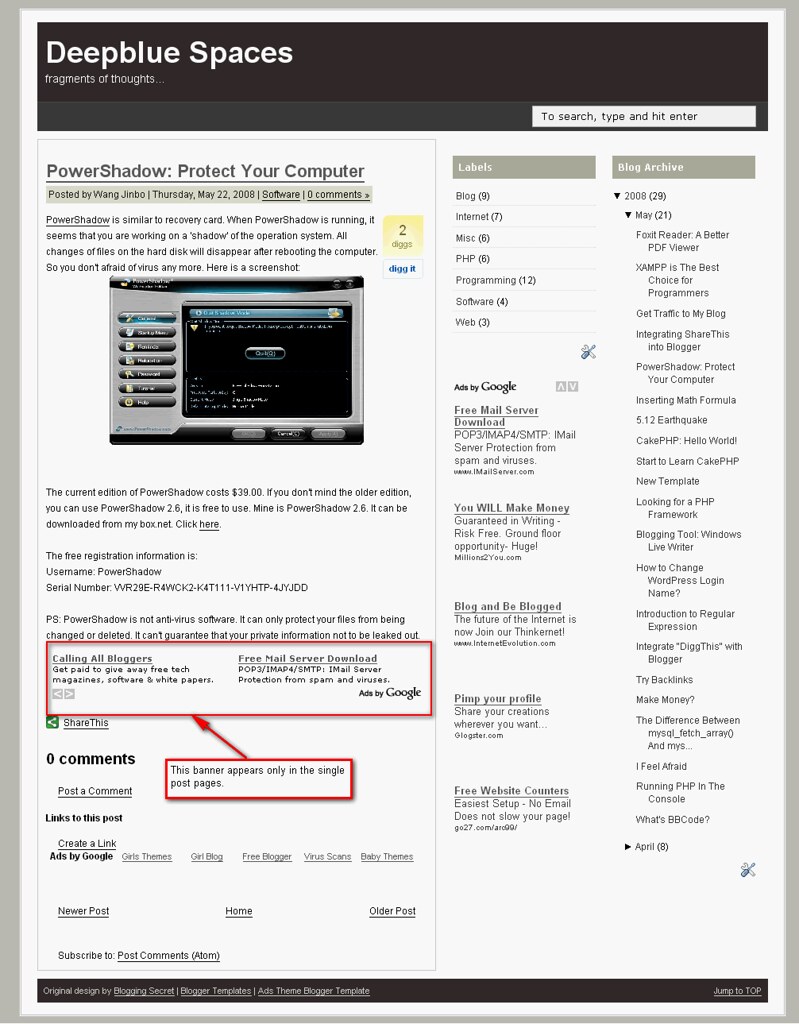
Blogger is a famous free blog service provider (BSP). It belongs to Google.com. Although it is free to use, you can use Adsense on you blog to make money. Inserting adsense is very easy. But sometimes we need more. For example, I want to show a 468 x 60 banner above the first article in the index page or achive pages. But I don't want it to be shown in a single post page. Moreover, I want to show another 468 x 60 banner below the article in each single post page only, but it won't appear in the index page or achive pages, etc. See below:
So the simple way won't work. How to solve it?

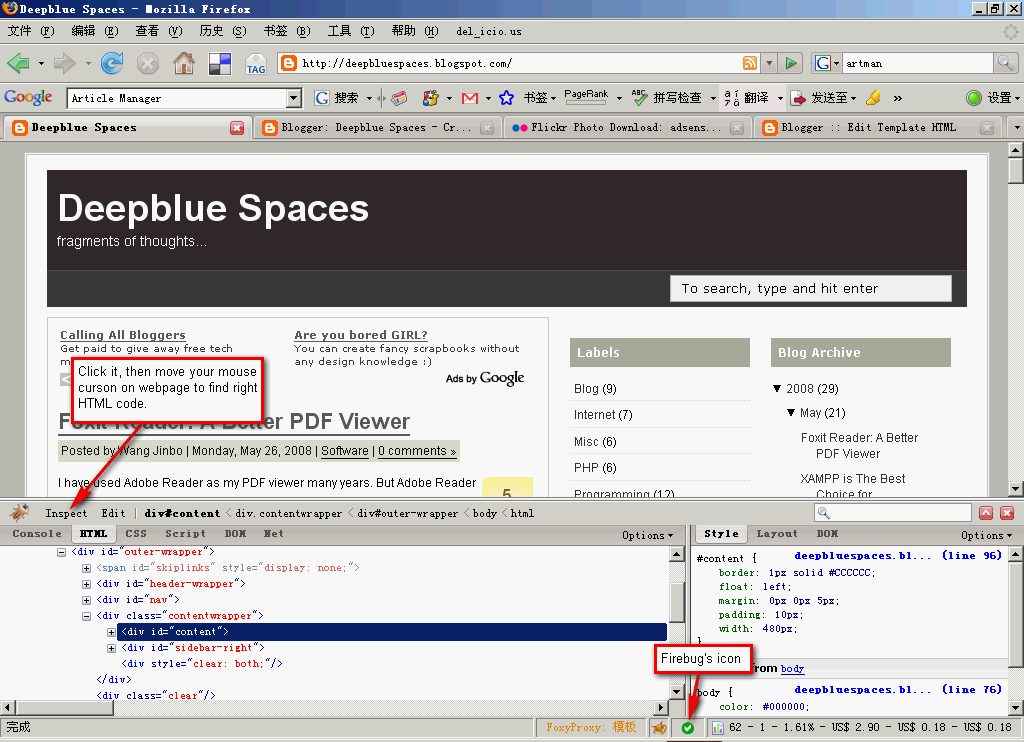
First we need some software tools. What I will use are Firefox, Firebug extension for Firefox, a text editor (Notepad++). That's all. Now let's begin.

Go to your Blogger -> Layout -> Edit HTML. Download the full template and use your editor to open it. Then use Firefox to visit your blog. Enable Firebug (right click its icon and make sure "Disable Firebug" isn't selected). Then click the icon and you can see the its interface. Click "Inspect" button (top left), and move your mouse on the webpage to find the right HTML code segment. Here's the screenshot.

I used Firebug to find out that the main content is located in a "div" whose id is "content". Then open your editor to find <div id='content'>. Add these lines after it:
<b:if cond='data:blog.pageType != &quot;item&quot;'>
  <div id='index_banner'>
    <b:section id='index-banner-only' locked='false' preferred='yes'>
    </b:section>
  </div>
</b:if>

Save and upload it. Then go to Layout -> Page Elements. You will see a new "Add a Page Element" above the blog posts area. You can add an Adsense banner. This banner won't appear in any single post page.

Now let's add the article page ads. In the same way, use Firebug to find the right HTML code. And then search it in your text editor. Or you can search for "<data:post.body/>". data:post.body stands for the content text. Add these lines below it:
<b:if cond='data:blog.pageType == &quot;item&quot;'>
your adsense code
</b:if >
Because I want to add Adsense below the article, just add Adsense code below it. But it won't work. You must use Ad Code Converter to convert your Adsense code, and then put it into your template.

OK. Now save your template and upload it. Go to "Page Elements" panel to add an Adsense banner. This banner will only display in the index page and archive pages, etc. It won't display in a single post page. However, if you open a single page, the ads below the content will appear.

PS: I think this trick will increase the Adsense CTR.

Monday, May 26, 2008

Foxit Reader: A Better PDF Viewer

I have used Adobe Reader as my PDF viewer many years. But Adobe Reader became fatter and fatter recently. Today when I opened three PDF files with it, my computer became very busy and slow. I open the task manager of Windows. To my surprice, the Adobe Reader used over 100 MB memory space! So I wanted to look for another PDF viewer.

I found Foxit Reader just now. Many people think it's better than Adobe Reader because it's smaller and faster. I have tried it. Very fast even I open five PDF files. That's it.
Foxit_Reader

The disadvantage of Foxit Reader is the font is not as clear as Adobe Reader. I don't know why it is.