I have been playing with Linux these days. Windows has gone. Although I met Linux about 5 years ago, I also used Windows at the same time. But Windows became slower and slower and there are too many viruses. Several days ago I can't bear the speed of Windows, so I decided to remove Windows and install Linux. I won't want to return the Windows world.
There are too many Linux distributions to choose. I think Gentoo Linux is the best one. Because its software package management is very elegant. It is a distribution based on source code. i.e. all the software is built from source code. So it is very suitable for programming. But it is hard to install. At last I choose Ubuntu, a desktop Linux distribution. Its installation is very easy and after 1 hour I got a whole operating system.
There are many interesting things in Linux. I will write something about it in the future.
Saturday, June 7, 2008

Friday, May 30, 2008
CakePHP: Working with View
In the last article, I wrote a 'Hello World' program.
class TestersController extends Controller{
var $uses=null;
var $autoRender=false;
function sayHello(){
echo 'Hello, CakePHP!';
}
}
?>
But it has a problem. According to MVC pattern, a controller shouldn't be used for displaying. However, that example uses 'echo' statement in the controller. It is a bad style. In MVC, view is used for showing data. So today I will write something about how to use view to display a page.
A view is usually a file containing much HTML but bit of PHP code. In CakePHP, a controller is associated with some views, depending on its name. For instance, the controller "Testers", its class name is "TestersController" and it must be located in app/controllers/testers_constroller. Its view must be located in app/views/testers/. Each action can have its view. For example, the view of TesterConstroller::sayHello() is app/views/testers/say_hello.thtml. No more to say, let's have a look at the view's content (say_hello.thtml):
Hello, !
You see, it's very simple, just displays a variable $name. Now the questing is: how to pass the variable from the controller? The answer is "set()". Modify the controller class above:
class TestersController extends Controller{
var $uses=null;
function sayHello(){
$this->set('name','Woody');
}
}
?>
Here, $this->set('name','Woody') set the variable $name. You see, now the controller don't contain output statement. It just set some variables and pass them to a view (because I removed "$autoRender=false", CakePHP will execute app/views/testers/say_hello.thtml). Now open http://localhost/cake/testers/sayHello (suppose your CakePHP project is in WEBROOT/cake/ directory), you will see "Hello, Woody!".
But there's is another problem. The result contains some more we don't want, like the big title "CakePHP Rapid Development" and the CakePHP's logo on the bottom right. Why is it? The answer is "layout". A layout is similar to a view. Considering a real website. It may contain many pages. But all the pages have some same elements, such as top banner, header text, CSS, etc. We don't need to put these things into all views. Just need layout once. Layout is used for sharing common view elements and it is usually a completed HTML file. Since we haven't create our layout, CakePHP will use its own.
Now let's create a default layout. Its file path is "/app/views/layouts/default.thtml". The content:
<html>
<head>
<title><?php echo $title_for_layout; ?></title>
</head>
<body>
<h1>Learn CakePHP</h1>
<?php echo $content_for_layout; ?>
</body>
</html>
And then change the sayHello action into:
function sayHello(){
$this->pageTitle='This is the title for the layout.';
$this->set('name','Woody');
}
Then run the action and check the brower's title bar.
How does a controller get data from a view?
Usually, views contain some forms to get users' input. According to MVC, the input data will be passed to controllers. Since it needs more examples, I plan to write something about it in some day in the future.
class TestersController extends Controller{
var $uses=null;
var $autoRender=false;
function sayHello(){
echo 'Hello, CakePHP!';
}
}
?>
But it has a problem. According to MVC pattern, a controller shouldn't be used for displaying. However, that example uses 'echo' statement in the controller. It is a bad style. In MVC, view is used for showing data. So today I will write something about how to use view to display a page.
A view is usually a file containing much HTML but bit of PHP code. In CakePHP, a controller is associated with some views, depending on its name. For instance, the controller "Testers", its class name is "TestersController" and it must be located in app/controllers/testers_constroller. Its view must be located in app/views/testers/. Each action can have its view. For example, the view of TesterConstroller::sayHello() is app/views/testers/say_hello.thtml. No more to say, let's have a look at the view's content (say_hello.thtml):
Hello, !
You see, it's very simple, just displays a variable $name. Now the questing is: how to pass the variable from the controller? The answer is "set()". Modify the controller class above:
class TestersController extends Controller{
var $uses=null;
function sayHello(){
$this->set('name','Woody');
}
}
?>
Here, $this->set('name','Woody') set the variable $name. You see, now the controller don't contain output statement. It just set some variables and pass them to a view (because I removed "$autoRender=false", CakePHP will execute app/views/testers/say_hello.thtml). Now open http://localhost/cake/testers/sayHello (suppose your CakePHP project is in WEBROOT/cake/ directory), you will see "Hello, Woody!".
But there's is another problem. The result contains some more we don't want, like the big title "CakePHP Rapid Development" and the CakePHP's logo on the bottom right. Why is it? The answer is "layout". A layout is similar to a view. Considering a real website. It may contain many pages. But all the pages have some same elements, such as top banner, header text, CSS, etc. We don't need to put these things into all views. Just need layout once. Layout is used for sharing common view elements and it is usually a completed HTML file. Since we haven't create our layout, CakePHP will use its own.
Now let's create a default layout. Its file path is "/app/views/layouts/default.thtml". The content:
<html>
<head>
<title><?php echo $title_for_layout; ?></title>
</head>
<body>
<h1>Learn CakePHP</h1>
<?php echo $content_for_layout; ?>
</body>
</html>
And then change the sayHello action into:
function sayHello(){
$this->pageTitle='This is the title for the layout.';
$this->set('name','Woody');
}
Then run the action and check the brower's title bar.
How does a controller get data from a view?
Usually, views contain some forms to get users' input. According to MVC, the input data will be passed to controllers. Since it needs more examples, I plan to write something about it in some day in the future.
Wednesday, May 28, 2008
Integrating Adsense into Blogger (for Experts)
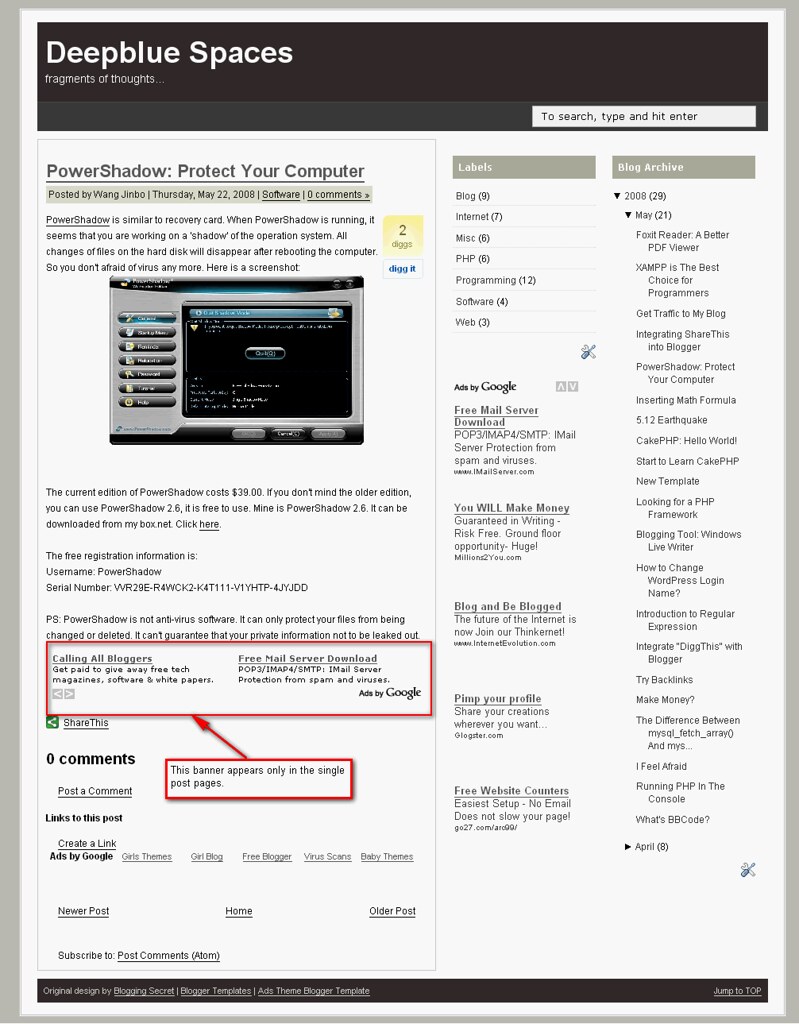
Blogger is a famous free blog service provider (BSP). It belongs to Google.com. Although it is free to use, you can use Adsense on you blog to make money. Inserting adsense is very easy. But sometimes we need more. For example, I want to show a 468 x 60 banner above the first article in the index page or achive pages. But I don't want it to be shown in a single post page. Moreover, I want to show another 468 x 60 banner below the article in each single post page only, but it won't appear in the index page or achive pages, etc. See below:
So the simple way won't work. How to solve it?
First we need some software tools. What I will use are Firefox, Firebug extension for Firefox, a text editor (Notepad++). That's all. Now let's begin.
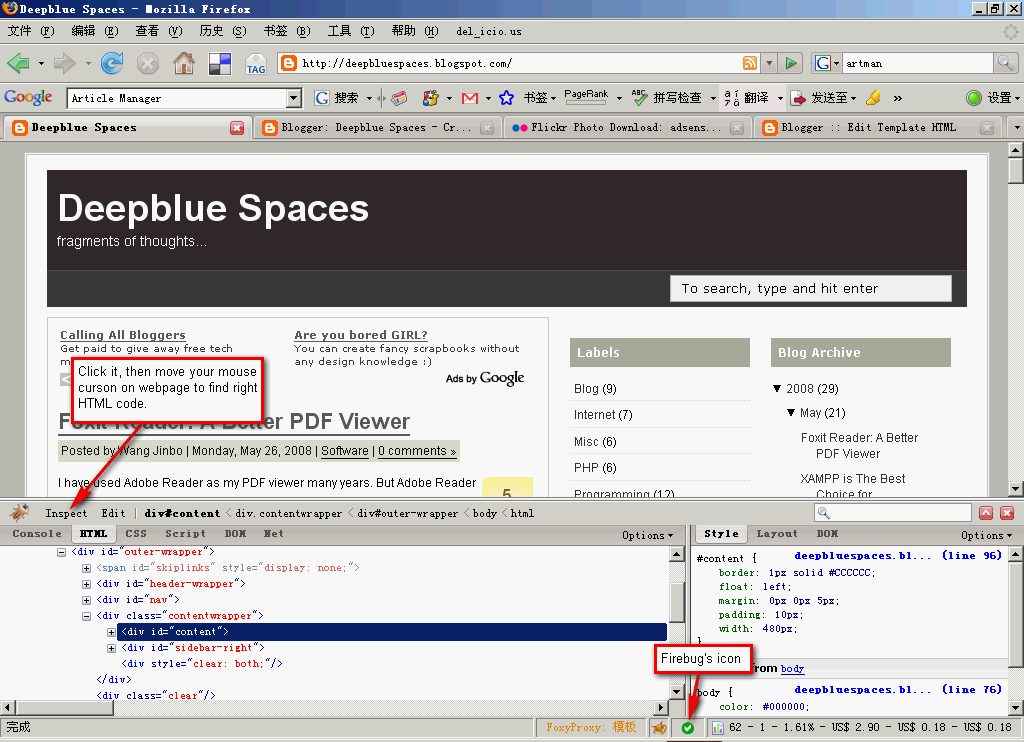
Go to your Blogger -> Layout -> Edit HTML. Download the full template and use your editor to open it. Then use Firefox to visit your blog. Enable Firebug (right click its icon and make sure "Disable Firebug" isn't selected). Then click the icon and you can see the its interface. Click "Inspect" button (top left), and move your mouse on the webpage to find the right HTML code segment. Here's the screenshot.
I used Firebug to find out that the main content is located in a "div" whose id is "content". Then open your editor to find <div id='content'>. Add these lines after it:
<b:if cond='data:blog.pageType != "item"'>
<div id='index_banner'>
<b:section id='index-banner-only' locked='false' preferred='yes'>
</b:section>
</div>
</b:if>
Save and upload it. Then go to Layout -> Page Elements. You will see a new "Add a Page Element" above the blog posts area. You can add an Adsense banner. This banner won't appear in any single post page.
Now let's add the article page ads. In the same way, use Firebug to find the right HTML code. And then search it in your text editor. Or you can search for "<data:post.body/>". data:post.body stands for the content text. Add these lines below it:
<b:if cond='data:blog.pageType == "item"'>
your adsense code
</b:if >
Because I want to add Adsense below the article, just add Adsense code below it. But it won't work. You must use Ad Code Converter to convert your Adsense code, and then put it into your template.
OK. Now save your template and upload it. Go to "Page Elements" panel to add an Adsense banner. This banner will only display in the index page and archive pages, etc. It won't display in a single post page. However, if you open a single page, the ads below the content will appear.
PS: I think this trick will increase the Adsense CTR.
So the simple way won't work. How to solve it?
First we need some software tools. What I will use are Firefox, Firebug extension for Firefox, a text editor (Notepad++). That's all. Now let's begin.
Go to your Blogger -> Layout -> Edit HTML. Download the full template and use your editor to open it. Then use Firefox to visit your blog. Enable Firebug (right click its icon and make sure "Disable Firebug" isn't selected). Then click the icon and you can see the its interface. Click "Inspect" button (top left), and move your mouse on the webpage to find the right HTML code segment. Here's the screenshot.
I used Firebug to find out that the main content is located in a "div" whose id is "content". Then open your editor to find <div id='content'>. Add these lines after it:
<b:if cond='data:blog.pageType != "item"'>
<div id='index_banner'>
<b:section id='index-banner-only' locked='false' preferred='yes'>
</b:section>
</div>
</b:if>
Save and upload it. Then go to Layout -> Page Elements. You will see a new "Add a Page Element" above the blog posts area. You can add an Adsense banner. This banner won't appear in any single post page.
Now let's add the article page ads. In the same way, use Firebug to find the right HTML code. And then search it in your text editor. Or you can search for "<data:post.body/>". data:post.body stands for the content text. Add these lines below it:
<b:if cond='data:blog.pageType == "item"'>
your adsense code
</b:if >
Because I want to add Adsense below the article, just add Adsense code below it. But it won't work. You must use Ad Code Converter to convert your Adsense code, and then put it into your template.
OK. Now save your template and upload it. Go to "Page Elements" panel to add an Adsense banner. This banner will only display in the index page and archive pages, etc. It won't display in a single post page. However, if you open a single page, the ads below the content will appear.
PS: I think this trick will increase the Adsense CTR.
Monday, May 26, 2008
Foxit Reader: A Better PDF Viewer
I have used Adobe Reader as my PDF viewer many years. But Adobe Reader became fatter and fatter recently. Today when I opened three PDF files with it, my computer became very busy and slow. I open the task manager of Windows. To my surprice, the Adobe Reader used over 100 MB memory space! So I wanted to look for another PDF viewer.
I found Foxit Reader just now. Many people think it's better than Adobe Reader because it's smaller and faster. I have tried it. Very fast even I open five PDF files. That's it.
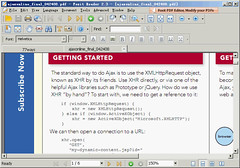
The disadvantage of Foxit Reader is the font is not as clear as Adobe Reader. I don't know why it is.
I found Foxit Reader just now. Many people think it's better than Adobe Reader because it's smaller and faster. I have tried it. Very fast even I open five PDF files. That's it.
The disadvantage of Foxit Reader is the font is not as clear as Adobe Reader. I don't know why it is.
XAMPP is The Best Choice for Programmers
XAMPP is an open source suit of Apache, MySQL, PHP/Perl. To many people, installing Apache, MySQL and PHP is difficult. XAMPP integrates them into one package. Moreover, it can run on many operating systems, such as Linux, Windows, Mac OS X and Solaris. With XAMPP, you don't need to edit any configuration file, just unpacking it, even no need to install, you can run your Apache web server with PHP and MySQL support.
Why did I say the XAMPP is appropriate for Programmers? Here are some reasons. First, XAMPP can run on many platforms, you needn't change your program or configuration files if you want to change the operating system. Second, the default configuration of XAMPP is convenient for debug program. So it is not appropriate for the final products. Third, XAMPP provides some add-ons to extend its function. Now you can integrate Perl and Tomcat into XAMPP. Besides, XAMPP contains much PHP extensions, for example, libjpeg, libpng, gdbm, zlib, expat, Sablotron, libxml, etc.
The current version of XAMPP is 1.6.6a. The Windows distribution contains:
Update: I received the comments. I agree with them, too. I think a good PHP programmer should know how to configure Apache, PHP and MySQL, etc. I think XAMPP is the best because it makes the work very easy. So it can save much time. Certainly, unstanding how they work is necessary for a good programmer.
Why did I say the XAMPP is appropriate for Programmers? Here are some reasons. First, XAMPP can run on many platforms, you needn't change your program or configuration files if you want to change the operating system. Second, the default configuration of XAMPP is convenient for debug program. So it is not appropriate for the final products. Third, XAMPP provides some add-ons to extend its function. Now you can integrate Perl and Tomcat into XAMPP. Besides, XAMPP contains much PHP extensions, for example, libjpeg, libpng, gdbm, zlib, expat, Sablotron, libxml, etc.
The current version of XAMPP is 1.6.6a. The Windows distribution contains:
- Apache HTTPD 2.2.8 + Openssl 0.9.8g
- MySQL 5.0.51a
- PHP 5.2.5
- PHP 4.4.8
- phpMyAdmin 2.11.4
- FileZilla FTP Server 0.9.25
- Mercury Mail Transport System 4.52
Update: I received the comments. I agree with them, too. I think a good PHP programmer should know how to configure Apache, PHP and MySQL, etc. I think XAMPP is the best because it makes the work very easy. So it can save much time. Certainly, unstanding how they work is necessary for a good programmer.
Subscribe to:
Posts (Atom)

 Posts
Posts